Knowledge Base and Documentation
A knowledge base is Aivory’s long-term document warehouse: Upload a set of documents once, then any conversation can load it up as a search question and answer automatically brings source references.This page covers the creation of the knowledge base, the library of documents, how to use in the conversation, the principle of retrieval, and the complete screening list of “recovery results are empty”.
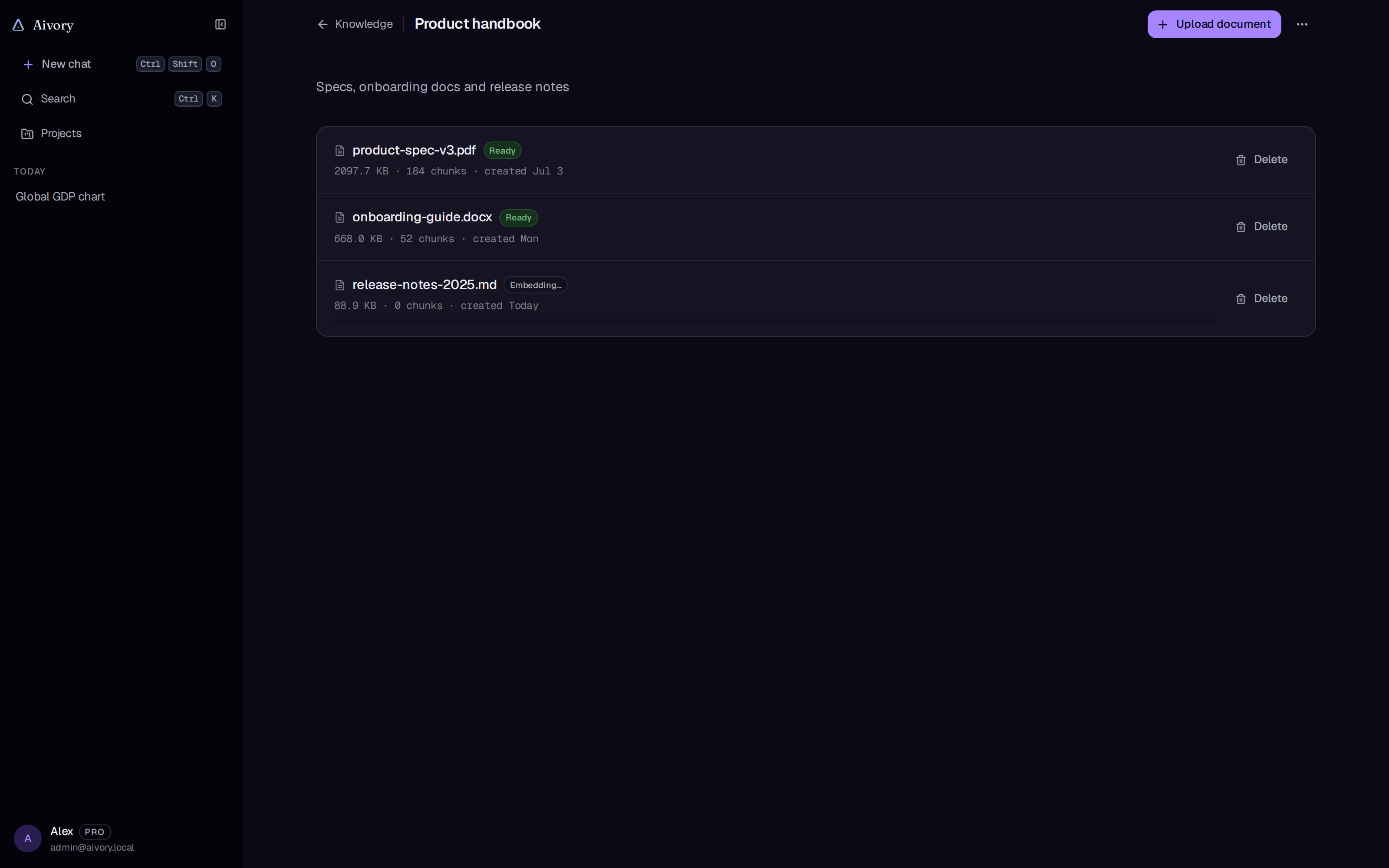
There are two other document roles alongside the knowledge base, all of which share the same set of analysis and search engines:
| Area of Role | Storage location | Scope of search | Typical uses |
|---|---|---|---|
| Conversation of temporary documents | uploaded that conversation. | Only the conversation. | One response to “Let me read this PDF” |
| The knowledge base | Independent knowledge base | Anything that contains the conversation. | Long-term reusable information |
| Project knowledge base | The project | All conversations on the project. | Team/Themed Information, see The team workspace and project functions |
Preliminary conditions
The knowledge base relies on three categories of back-end capabilities, which one will degrade into what behavior, first understand:
| depends on | Role of | Actions when not deployed |
|---|---|---|
the embedded model (kind='embedding' the model item, or the environment variable. | Document Vectorization and Question Vectorization | Incorporation cannot be completed, large documents cannot be retrieved; small documents can still be injected in full |
Qdrant(QDRANT_URL) | Density recovery | Vector retrieval disabled, RAG go back to the full text |
| MinerU + Object Storage (S3 / Ali Cloud OSS) | Scanning PDFs, Office documents, cloud resolution of images and OCR | Non-pure text document analysis fails, knowledge base document is marked as failing |
- Producing Docker Compose with built-in Qdrant containers, see Deployment of Docker Compose。
- embedding model Configuration in the admin console “channel/model”: hanging under an OpenAI type channel, fill in the request model name and dimension, any exposure to OpenAI
/v1/embeddingsServices in the format (OpenAI, Voyage, self-deployed BGE-M3 etc.) are available. Channel and Model与The Core Configuration。 - MinerU’s API addresses, tokens and object storage credentials are configured on the “Documents” page of the admin console and are saved without reboot.
All vectors of the same knowledge base (including the query vector when asked) must come from the same embedding model, the vector space of different models is incompatible with each other.
Creating a knowledge base
Enter: In the “knowledge base” menu at the bottom of the sidebar, go to the knowledge base list page and click on “Build new knowledge base”.
Create a conversation field:
| The field | must fill | Explained |
|---|---|---|
| The name | 是 | Not renamed within the same account (the same space) |
| Described by | 否 | Help you and query routing to understand what this library is about. |
| The embedding model | 是 | Select from an embedding model that has been enabled by the administrator, and display each model name and dimension (such as dim 1536) |
** Automated determination **: The vector dimension is determined by the configuration of the embedding model selected and does not need or can not be manually filled in. The list card will display "N-dimensional vector" after creation. The knowledge base of the dimension shares a collection in Qdrant, isolating tenants by payload.
After uploading the first document, the embedding model is locked, which determines the entire library’s vector space. The wrong choice can only be deleted to rebuild the library. Multiple knowledge base If you intend to hang in the same conversation at the same time, use the same embedding model (see reason list section 5 below).
The number of knowledge bases that ordinary users can create is limited by the user group (administrators set the “maximum knowledge base number” on the user group editing page, 0 for unlimited), see Users and quota。
Uploaded file
Go to the knowledge base details page and click on "Upload document". the Upload conversation box has two tag pages:
- ** Uploaded documents ** Select the local document;
- ** Added text ** Directly paste a text as a document into the library, suitable for fragmented notes.
Supported file types and analysis pathways
| Type of | Method of analysis. | The speed |
|---|---|---|
| Pure text (txt / md / csv / log / json / yaml / xml / html) | Locally directly read, like Markdown into the cutting block | Millisecond level |
| PDF (with a text layer) | Local instant text layer extraction, with graphics not sending OCR | Secondary |
| PDF (scanning pieces / no text layers) | MinerU cloud OCR | Minutes, depending on the number of pages |
| DOC / DOCX / PPT / PPTX / XLS / XLSX / Images | MinerU Cloud Analysis (including Table and Formula Identification) | Minute level |
Rules for scanning: If the document contains images and the text density is less than 200 characters per page, it is considered a scanning piece, go MinerU OCR; otherwise it is locally extracted, and the OCR time of the flower is spent only where it is really needed.
The actual uploadable extension name is controlled by the administrator's upload white list and the size ceiling (admin console "document" page), which is rejected when the file is uploaded and indicates a specific ceiling.
When the non-pure text document is analyzed, the original file first drops to your own configured S3 / OSS barrels, MinerU only gets a 1 hour valid pre-signed URL, your storage credentials are not out of the field; the back-source file is automatically removed from the barrels.
State of flow.
After uploading the document into the asynchronous flow line, the detailed page document table displays the status badge in real time:
| State of | showed | Meaning of |
|---|---|---|
| pending | in the row. | Entered and waiting. |
| parsing | in analysis | Extract text, scan the item at this stage go OCR |
| embedding | Embedded in | Structured cuts and batches called embedding model (up to 128 items per batch) |
| ready | Ready to | It can be retrieved, the table shows the number of cuts at the same time. |
| failed | failed | The flow line automatically tries again after 3 times and still fails, recording the cause of failure |
Document table columns: files, status, number of cuts, time added.
Failure and repetition.
- Inside the water line for each document. ** Automatically repeat three times. ** The content that has been analyzed during the re-trial will be cached, only re-run the failed embedding phase, and will not repeat the MinerU OCR that is charged.
- Three failures are set to "Failure" and record the reasons (such as MinerU not configured, object storage unavailable, embedding model error reporting).The interface tells you "Index fails. Remove the document and re-upload it": After eliminating the root cause, delete the document and re-upload it again.
- Analysis of failure documents. ** No is ** It is vectorized into the repository, and does not pollute the results of retrieval with occupied content.
- Repeated uploading of the same name document or failure to re-enter is fuzzy, and does not overlap the old slices in the curry.
Used in conversation.
Building a knowledge base
The chat input toolbar has a "knowledge base" selector for the book icon:
- Select one or more knowledge bases and attach the status. ** The current conversation ** and persistent, changing the conversation does not affect;
- Next to the icon shows the number that has been hanged;
- The entry on the narrow screen (phone) is received in the "+" menu of the input box;
- There is no knowledge base yet.
After uploading, each question will automatically search the library according to the following search process, without any special instructions. The "source" corner appears below the answer, and you can view the document name, page code, chapter path and original text fragments.
Within the team workspace, the knowledge base of the space can only be hanged; the knowledge base of the personal space is isolated from the workspace. The team workspace。
Single Document Questions (Interim Document Conversation)
Without building a library, drag the file directly into the chat input box can also answer:
- After uploading, the attachment chip displays "Indexed...", which can be sent after the resolution is completed; a PDF with a text layer is usually completed in seconds.
- Small documents (no more than the full text injection threshold set by the administrator, by default about 8000 tokens) directly ** The full injection. ** This round of questions is not vectorized, and can be used even without configuring Qdrant and embedding models.
- Large documents go through the complete "Question Routing + Search" process (see section below).
- When the analysis fails, the chip displays "Can't read this file" and provides the "Try again" button.
- The PDF that has been indexed will no longer send a full copy to the model in conjunction, avoiding the model side's repeat resolution slowing down the first word.
The conversation temporary file can only be retrieved within the conversation. If the conversation is in the project, you can upgrade the temporary file to the project shared document by clicking "Add to the project knowledge base" without re-embedding.
Status in the message.
At the top of each round of answers, a small card marks the documentation processing of the round, which is common in several ways:
| Suggested | Meaning of |
|---|---|
| Source is searched. | Go vector + keyword mix recovery, injected fragment of fate |
| Inserted in full file. | The file is small enough to enter the entire article. |
| Full article below. | The query route is judged as a global class question (summary / summary), processed in the full text |
| jumping to search. | Search route judges this sentence has nothing to do with the documentation, zero search costs |
| Analysis of documents. | The file is not ready yet, the round is not used. |
Tools for search (optional)
In addition to the default automatic injection, there is another platform. search_knowledge_base Tools: A model that supports native function calling can initiate multiple and multiple searches independently in one response.The main path for document queries does not rely on it, and is also available for models that do not support tool calls.
Principles of Recovery
Understanding the flow line helps to determine “why not retrieved.”
Filed under: Analysis, Cut, Embedded
上传 → 解析(本地 / MinerU) → 结构感知切块 → 批量嵌入 → 向量写 Qdrant,文本与元数据写数据库
Cut the cuts not by fixed number of words:
- Returns cut by title, paragraph, sentence boundary, targeting 400 to 800 tokens per block, never cut from the middle of the sentence, table, code block; neighboring blocks retain about 10% to 15% overlap.
- Each piece is embedded in the beginning of the title slice (such as Chapter 3 > Revenue Analysis 3.2), and isolated digital fragments can also be embedded in the context.
- Small-to-big structure (small-to-big): Use small blocks of vector index to ensure precise positioning, and then return the parent-level large segment to the model, taking into account accuracy and context integrity.
Question: Search for Route
In a document-loaded conversation, each question is first called by an inexpensive task model (increased by about 300 to 800 milliseconds) while performing two things:
- ** Classification of Intention **:
retrieve(Please ask for details and go search)full_doc(A summary of categories, processed in the full text),none(Not related to the documentation, jump over); - ** Request to rewrite **: Split speech problems into multiple precise search words, and combine recent rounds of history with references such as "it / this document".
Routing analysis failure or overtime is retrieve It is better to search and not miss the documents.
Search: dense + keyword mix
查询向量化 → Qdrant 向量检索 top-30
           ∥ 数据库关键词全文检索 top-30(中文分词)
→ RRF 融合排序 → 取 top-K → 回表取完整父级片段 → 注入上下文
- The two-way fusion significantly increased the numbering rate of special word and numbering queries ("Case 98" and "Article 4.2"), which is the weakness of pure vector retrieval.
- Top-K 8 by default, administrator can be changed; open ** Dynamic Top-K ** Then no longer take a fixed number, but inject all the fragments of the residual string similarity to the threshold value.
- Relevant search parameters (complete threshold injection)
rag_full_text_threshold、rag_top_k、rag_dynamic_topk、rag_similarity_thresholdThe adjustment in the “Documents” page of the admin console takes effect.
Reference to Retargeting
Injection of the model with unified numbers and source metadata:
[1] 《2025年度报告.pdf》第12页 · 第3章 > 3.2 营收分析
营收同比增长23%,主要来自……
The model is numbered by reference, the front end is rendered as the source corner, and the same set of UI is shared with the reference for the Internet search. Inject the content with a clear boundary tag package and declare it as a reference material rather than a user instruction in the system hint, reducing the risk of injecting hints in the document content.
Management of Knowledge Base
| Operated | Located | behavior |
|---|---|---|
| renamed again | Detailed page menu “Rename” | Change name only and does not affect documentation and vector |
| Removal of individual files | Delete button for detailed page file. | Delete the document and all the cuts and vectors after confirmation |
| Removing the knowledge base | Suspension menu “⋯” at the end of the list line, or menu “⋯” at the head of the detail page | See you |
Remove the knowledge base is a level-to-level cleaning: the confirmation pop-up clearly tells you that "it will permanently delete the library and all its documents and vectors, and the conversation that refers to it will automatically cancel the reference, and this operation cannot be restored."
- All documentation records and cuts;
- the corresponding vector in Qdrant;
- original documents on the disk;
- The conversation that has been loaded with the library automatically removes the reference, and the conversation itself is not affected.
Administrators can access a user's library page in more menus in the admin console user list, read only to see its knowledge base and the status, number of cuts, size, details of each document. Users and quota。
Search for Air Check List.
When the knowledge base is posted but there is no source in the answer, or the model says “can’t find relevant content”, check in the following order:
- ** File status is “Ready”**: knowledge base details page view status badge, in line / in resolution / embedded / failed documents are not involved in recovery. failed documents point to cause failure.
- ** Qdrant is installed. **:
QDRANT_URLFor space-time vector retrieval is completely disabled, only the full text is injected back, small documents are available, large documents cannot be retrieved. Production Compose is default with Qdrant; custom deployment checks the environment variable and container status, see The Core Configuration。 - ** Embedding Model is Available ** When the embedding model linked to the knowledge base is disabled, the channel key fails or the service is not available, the new document tab is embedded or marked as failing, and the query vectoring fails.
- ** Dimensions are matched. **:Qdrant collection Named by dimension (
aivory_c<维度>If you have replaced the output dimension with a different embedding model without synchronizing the dimension configuration, the vector will write the incorrect collection, which appears to be written normally but can never be retrieved. ** Vector maintenance ** Rebuild vector: The system re-embodies the slices of text saved from the database and does not require the original file, but consumes embedded API calls. Backup and Migration。 - ** The embedding model is consistent. ** When the same conversation carries multiple knowledge bases, the system will verify their embedding model consistency, and the inconsistency will clearly report the error instead of silently returning the error result.
- ** Does the scanned PDF version come with MinerU? **: When there is no MinerU + object storage, the scan cannot resolve the content, and the document is marked as failing.
Articles 2, 4 and 6 above Common Questions The corresponding entries (“Why the knowledge base search results are empty,” “How to do EMBEDDING_DIM doesn’t match the embedding model,” “When the scanned PDF is uploaded, the content can’t be resolved”) contain more complete configuration examples.
The fastest method of authentication: send a few KB of pure text small file directly to the question in the conversation. Small file inject the full text, does not rely on Qdrant and embedding model, if it does not answer correctly, the problem is on the model side rather than the retrieval link; if the small file is normal and the large file is not, click the list above to see the vector link.