Users, quota and credits
This page covers three pages tagged "Users" in the main category: Users (/admin/users The user group (/admin/user-groups and redeem code (/admin/redeem-codes) and the associated group-based model quota, credits system and daily limit.
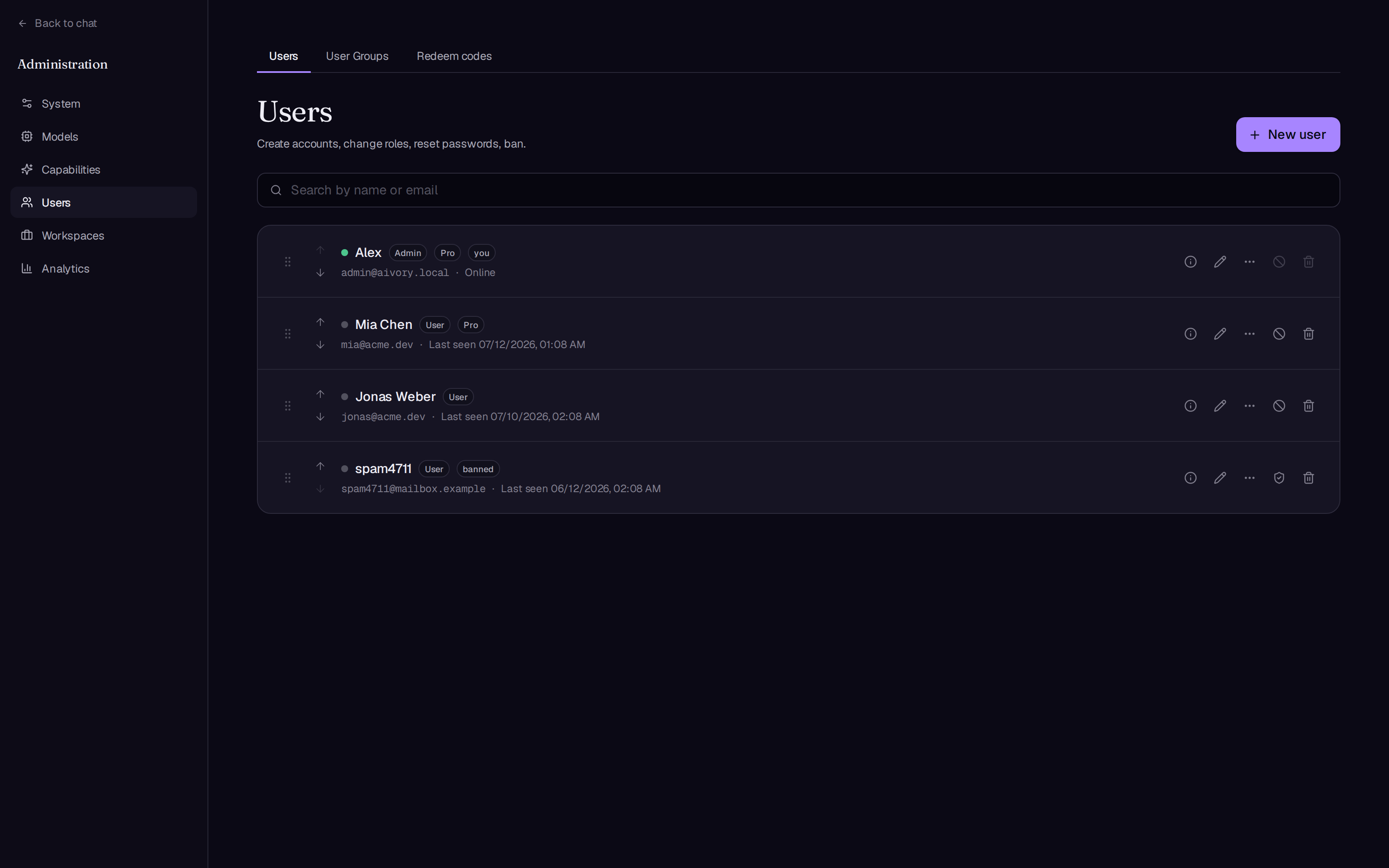
User management
List and search.
- ** searched **: Vague search by name or mailbox, automatically submitted after the input stops 400 ms (server-side filtration, large number of users remains complete).
- ** The page ** Page by page, 50 articles per page.
- ** State of Online. ** A round spot on the left side of each line, green, represents online. Criteria: Requests for over-the-line authentication within the last 5 minutes (active time up to one update per minute). Offline users display the "last time online" time, and never logged in users display "never logged in".
- ** Inside the emblem. ** Role (ordinary user/administrator), non-standard user group name, non-standard user group name
activeStatus (such as blocking) and the “you” that marks your account. - List supports drag adjustment of display order.
The new account.
In the “New Users” section, fill in:
| The field | Requested |
|---|---|
| The mailbox. | Requires a valid mailbox format. |
| The name | Selected by |
| The code | At least 8 characters. |
| Role is | Ordinary User / Administrator |
The administrator directly. ** No mailbox verification. ** Suitable for internal deployment or for colleagues.
The editorial account.
Each line of the pencil icon opens the editing bullet window:
| The field | Explained |
|---|---|
| Role is | ordinary user / administrator; ** You cannot change your role. ** |
| user group | Determine the model and quota available to the user |
| Member expiration | Date selected, left empty represents permanent; after expiration returns to the previous user group |
| Two Steps of Verification | The "Reset two-step authentication" button appears only when the user has enabled 2FA for a scenario where the user loses the authenticator device |
| Restore the code. | Enter a new password (at least 8 characters) to reset; keep the original password empty |
| Permanent credits | Directly rewrite the user's permanent credits balance |
The information icon (view information) opens the only reading panel: mailbox, role, status, user group and expiration time, permanent credits, the group’s credits quota, two-step verification status, recent active, creation time.
Blocking, Unlocking and Deleting
- ** Banned ** is globally effective in real time: old tokens immediately expire, ongoing generations are discontinued, refresh tokens are cancelled, mechanisms are detailed Overall Background Unlock the button in the same location.
- ** Eliminated ** The user has a confirmation window and cannot be revoked. delete is ** Asymmetrically ** Confirm that the account is immediately locked out (with the blocking mechanism), the "deleted" logo appears in the list, reset (conversation, message, file, vector, disk cleaning) is completed by the background task batch, and the line automatically disappears after completion - the deletion of the large account no longer holds the page. the deleted account can not be unlocked "reset"; if the process starts again, the unfinished deletion will continue automatically.
- Self-protection: You cannot block or remove yourself.
Read only drill.
Each row of the “More” menu provides two only-read drilling pathways for misuse of scanning and support work orders:
- ** Conversation recorded **:
/admin/users/:id/conversationsList all the user sessions (including archived), enter a single session to view the full message timeline, rendering completely consistent with the user side (including reasoning blocks, tool cards, references, images), but does not provide any editing / re-generated input. - ** Project and Knowledge Base **:
/admin/users/:id/libraryThe user's project, knowledge base documentation and generated graphic library (graphic library pages loaded).
user group
The user group is the carrier of the membership layers: the name, price and feature list is displayed on the user's subscription page; the model permissions and usage quota are displayed on the user's subscription page. ** Editing page model ** Configuration by group (see section below).
Group of fields
| The field | Explained |
|---|---|
| The name | 如 Free / Pro / VIP |
| A brief presentation | Showing a word on the subscription page. |
| The price (USD) and the price (Yuan) | Only for display, the platform itself does not built-in payments |
| Maximum number of projects/maximum number of knowledge bases/maximum number of workspace | 0 is unlimited. |
| The storage space (MB) | each group of users. ** Non-imaging documents ** The maximum total capacity, 0 = unlimited; the document uploaded after the full amount will be rejected and asked to clean, the user can view the amount of use and cleaning on the "Documents" page (images are not included). |
| credits per cycle | This group is issued each cycle. ** Effective credits ** Not used at the end of the cycle. |
| Updated cycle | Time Effect credits How long to reset once, hours / days / weeks |
| Functional Presentation | Each line, the subscription page to display a list (pure marketing text, does not produce functional effects) |
| Deep research | Switch: Allow the group to use the Deep Research mode |
| The workspace | Switch: Allows the group to create workspace (the maximum number is seen; 0 = Unlimited) |
| Showing on the subscription page. | After the group is closed, it is hidden from the subscription page and users in the group are not affected. |
- Registration of new users automatically ** Confirmed Group ** (There is a default badge on the list); the default group cannot be deleted.
- When other groups are deleted, members within the group move to the default group and cannot be revoked.
- Lists support drawing ordering that affects the display order of subscription pages.
Group list below
The page also holds four global settings:
| set up | Explained |
|---|---|
| Number of credits per dollar (global) | credits_per_usd 1 USD is equal to how many credits, is the total switch of the credits system, ** 0 = Closed credits ** |
| user group purchase link (global) | Subscription page for pay group card "Buy" button; leave empty display "Contact Administrator" |
| credits Additional links (in full) | User buying permanent credits |
| Excess indication | Text displayed when a user reaches a model’s maximum usage limit |
Model of quota
在** Editing page model ** The “Permissions” partition (model > model > settings) configures chat and image model by group:
- ** granted switch. ** Open indicates that the group can use this model. ** Once a group is assigned, the unallocated group cannot see/use the model. ** At all shutdown, the model is open to all unlimited.
- ** The Cycle ** A fixed window per N days or N hours.
- ** Type of upper limit ** Two choices one.
- ** number of times ** How many times can the window be called?
- ** Quantity ** The upper limit of the cumulative cost per model quota in the window.
- ** The upper limit **:0 indicates there is no limitation during the cycle.
** Acts beyond the free quota **: If the credits system is enabled (credits_per_usd greater than 0) and the user has a balance, the model turns to that user ** Credit Deposit by Real Cost ** Continued use; credits are not sufficient, or when the credits system is not enabled, requests are intercepted and the "excess reminder" text is displayed.Administrator accounts and "no quota line model" are not subject to this limit.
Typical configuration: to a Free group model "20 times every 7 days", to the group "per cycle credits" send some time-effective credits. users first consume the number of free times, after using automatically turned into deductible credits, the two quotas independent of each other.
Credit system
Two types of credits
| Type of | Source of | The life cycle |
|---|---|---|
| Effective credits | user group "credits per cycle" automatically issued by update cycle | The cycle ends unused. |
| Permanent credits | Set directly by the administrator on the user editing page; or charged by the administrator after an external purchase via the "credits link" | Never to Period |
** Reduced order ** Deposit of time-effective credits and deduction of permanent credits.
exchange and exhibition.
- Deposit amount = Cost calculated by model quota for the call (USD) ×
credits_per_usd。 - model picker for walking credits conversation model display ** Relative multiplier logo **
×N, N = (input price + output price) ÷ 5, retaining a small number, allowing the user to intuitively compare the cost of each model. - On the billed image model, when the free exhaust is converted to deductible credits, the selector displays "N credits" after the model name, N = single image price ×
credits_per_usd(Example: one $0.2credits_per_usd= 100 to show 20 credits). - Users can see the current credits balance (including the expiration time) and the permanent credits balance on the subscription page; each AI response also records the consumption of this round.
Payment time: send out immediately, failure is not counted
- ** Normal completed **: Count the number of quota times in the window, deduct credits by full amount.
- ** The user stops. ** As long as the model has produced content, the same count and deduct credits according to the actual cost of the token produced.
- ** Failure or interception before sending ** (upstream reporting error, quota excess, moderation interception): no counting, no deduction.
Pre-examination of credits
Forecasting and blocking insufficient balance requests (open by default) in System > Global Settings: ** Go to Credits ** The round, after the real request assembly is completed, before it is sent to the model, predicts the input token (plus a fixed 2k output reservation) and exchanges it for credits; if the user's available balance (time effect + permanent) is exceeded, it is directly rejected by "insufficient balance" and does not generate any upstream consumption.
redeem code
redeem code for batch issuing members: each code assigns one ** user group ** with paragraph. ** Effective length ** The user enters the redeem code on the subscription page to complete the conversion.
generated batches.
The “New Construction”:
| The field | Explained |
|---|---|
| corresponding to user group | Groups that users joined after the exchange |
| Effective duration (day) | the number of days after the exchange of members; ** 0 is permanent. ** |
| Maximum number of uses. | Default 1 (one-time); enlarge the activity code that can be shared by multiple people |
| Redemption of code. | Not exchanged after the expiration is invalid; left empty = never exchanged (note this ** code itself. ** deadline, not the membership period. |
| Secondary Name | Background internal tags, easy to filter, users are not visible |
| observed | Internal observations |
| generated quantity | ** 1 to 1000 ** Beyond the rejection. |
All the code pop up immediately after generating this batch, can be copied individually; the list page also has "copy all unused" and "export CSV" (including code, group, state, length, number of times used, batches, notes, time and so on).
Management and State
- ** Filtered ** Filter by status (all / unused / converted / disabled / expired) and batch names; list 20 items per page.
- ** State of ** Unused, partially used (partly used in multiple codes), exchanged (full), disabled, expired.
- ** Prohibited / Activated ** Disable reversible, retain audit records, and unchanged codes immediately expire.
- ** Eliminated ** Remove the single code or the entire batch, together with the exchange record removed, can not be revoked; ** Members already awarded are not affected. ** The end period naturally returns.
- ** Exchange of records ** Each code can see the exchange audit (who, when, from which group to switch).
Exchange behavior and limits
- exchange for the user. ** Changed immediately ** If the group of code is different from the user's current group, the server first returns the confirmation request, the front-end pop-up message "will be switched to the X group" comes into effect after the user's confirmation.
- It automatically returns to the user group before the exchange.
- ** Explosion restrictions ** Switch the interface by IP stream limit, by default up to 10 times within 60 seconds, environmental variables available
AIVORY_API_RATE_LIMIT_REDEEM_CODE_MAX/AIVORY_API_RATE_LIMIT_REDEEM_CODE_WINDOWadjusted to see. Advanced environmental variables。
The current version of the redeem code is ** User group + length **; credits are issued through the user group's "per-cycle credits", and permanent credits are manually adjusted by the administrator on the user's editing page.
Daily Message and Picture Limit
Global daily hard limit for each person, independent of user group and credits:
| 项 | Environmental variables (first start of seeds) | The default value | Position of back. |
|---|---|---|---|
| Maximum daily message | DAILY_MESSAGE_LIMIT | 200 | System > Global settings > Daily message limit |
| Maximum daily pictures | IMAGE_DAILY_LIMIT | 30 | System > Global Settings > Upper Limit for Daily Images |
Environmental variables are ** The first launch. ** When the seed is written into the setup table; after the running period the table is set as standard, the backbone is changed behavior, there is no need to restart. Core environmental variables。
Related reading: The entrance of the model permission is in Channel and Model the “Privileges and quota” section; the usage and cost matching is quantity and analysis. User view of the subscription page Account and subscription.。