Channel and Model
Model access is divided into two levels: ** The Channel (Channel) “Where and with what agreement.” The Model (Model) ** Hang under the channel, the tube "which specific model, what capabilities, how to calculate." both layers are in the background to maintain, store the database, add the deletion of zero code distribution, after saving is effective.
- channel page: “model > channel”
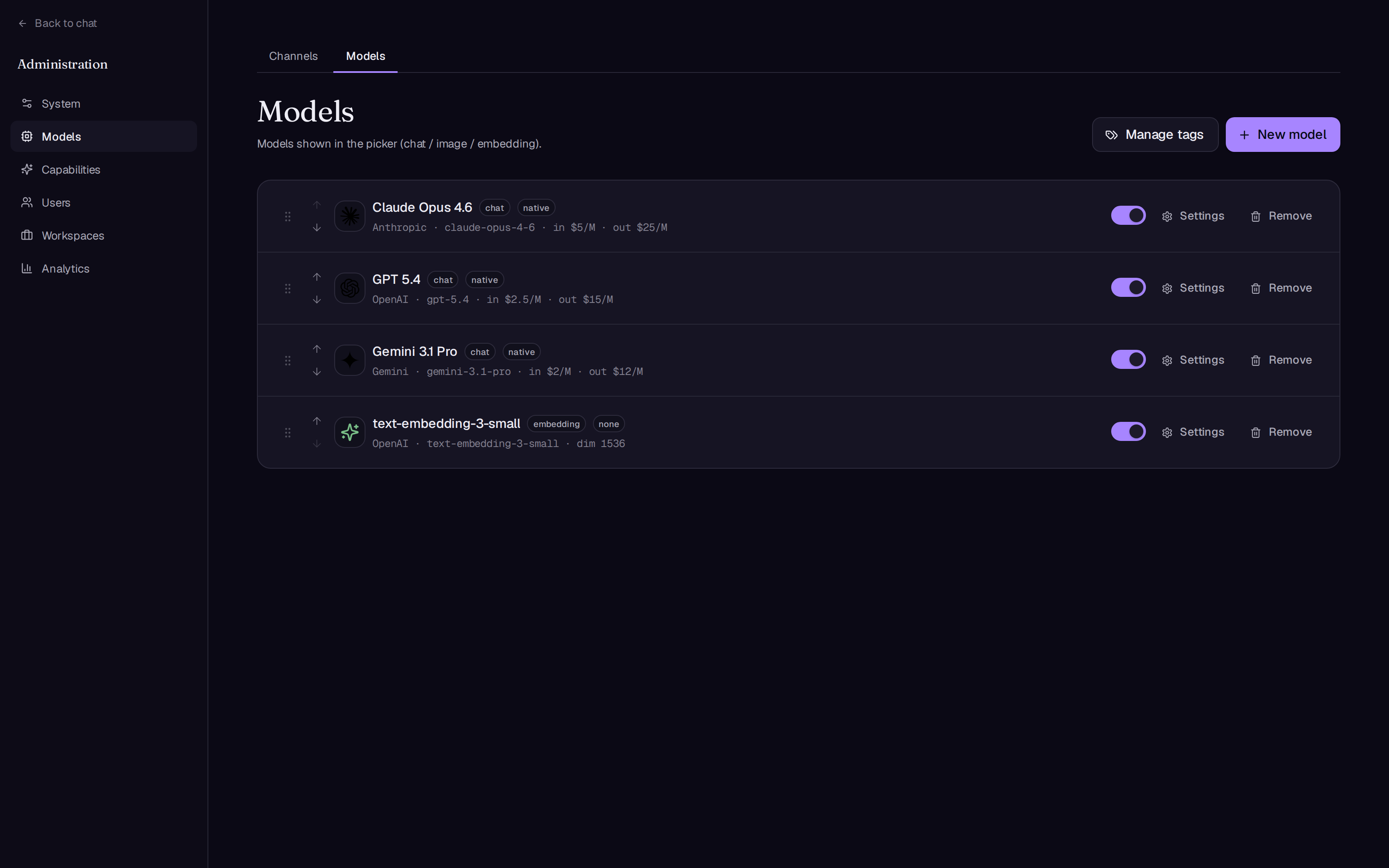
/admin/channels) - Model Page: “Model > Model”
/admin/modelsEach model has a separate setup page./admin/models/:id
The channel
One channel = one Base URL + one API Key + one protocol type. The same type can build multiple channels (for example, two openai channels point to different gateways, different keys).
The channel field
| The field | Explained |
|---|---|
| The name | Requirements for internal signage, such as Anthropic production |
| Type of | openai / claude / gemini Decide which protocol to use for the request body, tool call and stream format |
| The interface format. | 仅 openai Type of appearance: chat (Classic Chat Completions) or responses (Responses API), selected when creating a channel, all conversation models under that channel are used unified |
| Base URL | Use the default endpoint of the manufacturer; can point to the official endpoint, its own unified gateway or arbitrary compatible endpoint. |
| API Key | Encrypted storage, API response is not displayed; empty when editing means that the original API key is retained |
| Activated | The model under this channel is no longer available after closing. |
When accessing “OpenAI compatibility” upstream, such as DeepSeek, one-api/new-api gateway, self-deployed reasoning services: type selection openai The format is usually selected. chat (Many third-party compatible endpoints only implement Chat Completions), the Base URL fills the address of the service. That is, the four common upstream categories (Anthropic, OpenAI, Gemini, OpenAI compatibility) correspond respectively. claude、openai(responses 或 chat)、gemini、openai(chat)。
If the endpoint actually only supports Chat Completions, it is selected. responses The format, tool calls, and streams are overall wrong. The minimum requirement for channel endpoints (including transition gateways) is ** Transmits the function calling fields of the native conversation endpoints with the SSE stream ** It is recommended that the original protocol be fully transmitted, otherwise thought blocks, cache breaks and so on will be lost.
Verification and management of channels
- ** Verified ** The channel page does not have a separate “test” button. After building the channel and hanging the model, it is recommended to send a message directly to the model in the chat. ** Tools that trigger a message call. ** (For example, make it search online), three things are transmitted by one authentication protocol, an API key and a tool.
- ** Ordered ** List supports drawing ordering (or in-line up/down) and the ordering is persistent.
- ** Eliminated ** Remove the channel. ** Remove all models. ** Confirmed bullet windows.
- The list row displays type badges, interface format badges, “disabled” badges, and the status of the Base URL with the “API key/API key not set”.
The model
The new model conversation box only requires the creation of the necessary elements: channel, type (kind), display name, request_id Icon, resume; the rest is adjusted on the settings page.The new model is default: enabled, tool mode native Visual Open, Streaming Open, and Deep Research Open.
Click the gear icon on the model line to enter the settings page, as described by section as follows.
Basic information
| The field | Explained |
|---|---|
| The channel | The main channel of the model |
| Down the channel. | You can choose, see below. Down the channel. The Section |
| The Type (Kind) | chat The Conversation /image (Image is generated) embedding (Vector embedded). type determines which partitions are displayed subsequently: conversation behavior only chat, vector dimension only embedding, single price with generating overtime only image |
| Showing name | Users' names seen in the model picker, such as Claude Opus 4.8 |
| request_id | The actual model ID assigned to the upstream API (decomposed with the internal ID), such as claude-opus-4-8 |
| Symbols | Three typing options: leave empty (with default icons), emoji characters, image URLs; can also be directly ** Uploaded Iconic Document ** |
| briefly | A line of text displayed in the model picker |
| Activated | Users are not visible after closing. |
| Show the order. | The smaller the number. |
Upload only accepts PNG, JPEG, and SVG. ** No more than 256 KB ** (Front End Pre-Check, Service Side Second Verification). Icons are rendered at approximately 16 to 32 px in the selector, without the need for a big picture. The URL returned after successful uploading is automatically filled in the icon input box.
Note when deleting a model: An existing conversation that refers to the model can still be browsed, but can’t continue to send.
Conversational behavior (only chat model)
** The tool mode (tool mode) ** Three values to determine how platform tools (Search, Python sandbox, diagram, knowledge base retrieval, etc.) hang to the model:
| Valued | behavior | Applied to |
|---|---|---|
native | Definition and resolution of calls using the native function calling format for the channel to which the model belongs | Model that supports native tool calls (default) |
prompt | Do not go to the native field, change the text protocol description tool and call format with the tip word stacked. | Function calling is not supported, but instructions follow a model that is still available. |
none | Absolutely toolless, pure conversation | Models that do not require or cannot use tools |
** Three Switches **:
| switched | Explained |
|---|---|
| The Vision (Vision) | Supports image input. After shutdown, the model does not receive image attachments or participate in internal processes that require visual capabilities. |
| The Stream (Stream) | Switch to blocked calls when closed and get a full response once pushed to the front end. Individual SSE upstream use is not supported. |
| Deep research | Is Deep Research mode allowed on this model? |
** The system word. ** A model-level system prompt, issued from a combination of platform hints, can be used to set a proprietary person for a particular model.
** Parameter controls (parameter controls) ** The model exposes the user to adjustable parameters (such as the “Deep Thinking” switch and the “Thinking Intensity” selector).
| complaint | Configuration item |
|---|---|
| The Switch (toggle) | Key name key, display text, icons, default values, and each JSON fragment when it is opened/closed |
| The Selection (Select) | Key name key, display text, icons, default values, several options (value/text/a JSON fragment), optionally "only displayed when a key is equal to a value" |
Each JSON fragment is ** Direct deep fusion of real parameters into upstream requests. ** Claire is filled thinking OpenAI/Gemini fills out the respective API documentation and writes the actual API documentation for the model. The user can only select values in the predefined controls and cannot inject any parameters. The editor provides "Advanced: Original JSON" to edit the entire configuration directly.
** Tools called (only model for OpenAI Responses channel) ** Open “Use OpenAI Official Tools”web_search、code_interpreter、image_generation These built-in tools are implemented by OpenAI on the server side to replace the system built-in tools.
Level of moderation
Each chat model opens the "generate pre-audit prompts" switch separately: each ** New user suggestions. ** (Without history) audits before generating, intercepts, and the round ends with a rejection (no count, no credit).
| The model | behavior |
|---|---|
| Keyword matching (keyword matching) | The tip matches the global list of "violation keywords" and is intercepted. |
| The Audit Model (Model) | Instructs the global designated "audit model" to be issued first, and makes a release/interception judgment according to the "violation type" list. |
The overall section is configured on the “System > moderation” page:
| The field | Explained |
|---|---|
| Key words violations | Each line, the keyword mode is used, the page shows real-time keyword count |
| Auditing model | Select from chat model, model mode is used; model mode is not valid when "not selected" |
| Types of Violations | A category per line (such as politics, pornography, violence) as the basis for judgment of the audit model |
| Intercepted language | Notice the text displayed to the user when intercepted |
The call for the audit model is recorded in the usage log for "moderation" purposes, which can be viewed by usage in "data > usage", see quantity and analysis.。
Permissions and quota (chat and image model)
The "Privileges" partition grants model access according to user group and sets a cycle quota (number or quota) and the model is open to all unlimitedly when no group is enabled. Users, quota and credits。
calculated
The administrator allocates the price by model, and the system accounts for the actual amount after each call (and as a basis for credits):
| The field | Applicable Kind | Explained |
|---|---|---|
| Price of input (1M token) | chat / embedding | The dollar price per million tokens entered |
| Export price (1M token) | chat / embedding | The dollar price per million tokens exported |
| Caching to read $/1M | chat | The token is stored separately at this price and does not repeat the input price. |
| Cache written in $/1M | chat | Book the token price. |
| Price of Single Picture | image | The dollar price for each chart generated |
| Generating Overtime (second) | image | A single image request exceeds that number of seconds, i.e. interrupts and reports "generate overtime"; 0 = Unlimited |
| Dimensions of Vector | embedding | The vector dimension of the embedding model output, locked when building the knowledge base, must be filled in with the upstream document. |
Every model at the end of channel
Each model can specify an alternate “channel” separately to enhance usability:
- ** triggered ** The last transmission layer error of the main channel (dialogue, TLS, connection reset, response head overtime) or returns HTTP
401 / 403 / 408 / 409 / 429 / 5xxAt the back end. ** Change the channel automatically. ** The user does not immediately see errors, only failure at the bottom of the pocket indicates failure. - ** not triggered ** The user is actively stopped.
400Client errors that can’t be fixed by waiting for channel change only cover the request-building phase; do not interrupt again after the stream starts (200) because it’s not safe to re-install the content that has already been streamed. - ** Binded ** The channel must be with the main channel. ** Same type, same interface format ** (Try again using the main channel’s report format, changing channel is not equivalent to changing protocol), only the URL and Key are different.
- ** The tool is friendly. ** In a round of multiple tool calls, any time the upstream sub request fails will be cut to the bottom of the pulley continued, without running the entire round of the tool; the round is only used once the bottom of the pulley, the whole wheel is marked as the bottom of the pulley.
** Observability on the side. ** Each call record is serviced with a channel; the go-to record is displayed with the “Data > Usage” logo. ** Also remembered. ** (State error, zero token zero cost, does not account for user quota), point "Error" logo can view upstream original message error, support "only error" filtering, easy to judge the health of the main channel.
At the end of this channel. ** Change the line without modeling. ** In “System > Global Settings” there is also “model + overtime (second)”: when the selected model has no output within N seconds, switch to another model to respond. Place set up.。
Designation of the overall model
Several platform-level functions each point to a particular model by a global setting, configured as follows:
| set up | Located | Explained |
|---|---|---|
| The Conversation Model | The overall system setup | New user/default model not selected |
| Task model | The overall system setup | Internal LLM calls unify it: title generation, query routing, context-compressed summary, memory extraction, etc. Recommend cheap, fast, instructions follow good small model |
| Description of the word model | The overall system setup | Draw the text model of the pre-colored clue; select "no" and skip the colour |
| Model of Audit (Audit) | The overall system setup | The second model for verifying the answers under the examination mode, ideally a strong model with different manufacturers with the main answer; selecting "no" is the closure of the examination mode. |
| Overtime + overtime. | The overall system setup | See the explanation. |
| Auditing model | The system of moderation | Modeling Modeling Modeling Modeling Modeling Modeling Modeling Modeling Modeling Modeling Modeling Modeling Modeling Modeling Modeling Modeling Modeling Modeling Modeling Modeling Modeling Modeling Modeling Modeling Modeling Modeling Modeling Modeling Modeling Modeling Modeling Modeling Modeling Modeling Modeling Modeling Modeling Modeling Modeling Modeling Modeling Modeling |
| The embedding model | Capacity Archive | The knowledge base and documentation vectorization are necessary, from kind=embedding Selection of model; ** Locked after first installation. ** Avoid mismatching of old vector and new model dimensions |
Each call of the task model, examination model, audit model, image tip model is recorded in the usage log according to their respective purposes, which part of the expenditure is also counted in the user cost caliber.
Management of label models
Tags used to classify and filter models in the model picker (such as “recommendations”, “new”, “experiments”):
- ** Management of labels **:
/admin/model-tags(go to the "Manage Tag" entry on the model list or model editing page), support adding, renaming, deleting; name duplication will be rejected. - ** Distribution of labels **: In the "Label" partition on the model settings page, the label filtering of the selector immediately comes into effect.
The next step is to get the model. Users, quota and credits Divide model permissions and quotas for different user groups; see Upstream connectivity issues at the deployment level The reverse proxy与 FAQ。